Beginnen Sie mit dem echten Foto
Verwenden Sie das Kunden-JPG oder PNG, kein Platzhalter-Asset.


Dateien für UV-Laser-Workflows
Kunden senden flache Porträts, Tierfotos, Erinnerungsbilder und Produktaufnahmen. 3DConversions verwandelt sie in prüfbare 3D-Tiefendateien für Kristall-, Glas- und Subsurface-UV-Laser-Workflows, die Sie weiterhin auf Ihrer Maschine verifizieren. Upload und Vorschau sind kostenlos, danach geben Sie die Datei für 5 Credits ($5 USD) frei.
Keine Kreditkarte erforderlich. 25 kostenlose Credits enthalten, genug für 5 freigegebene Dateien. Keine Modellierer-Warteschlange. Kein individuelles Angebot. Keine Credits werden verbraucht, bevor Sie freigeben.
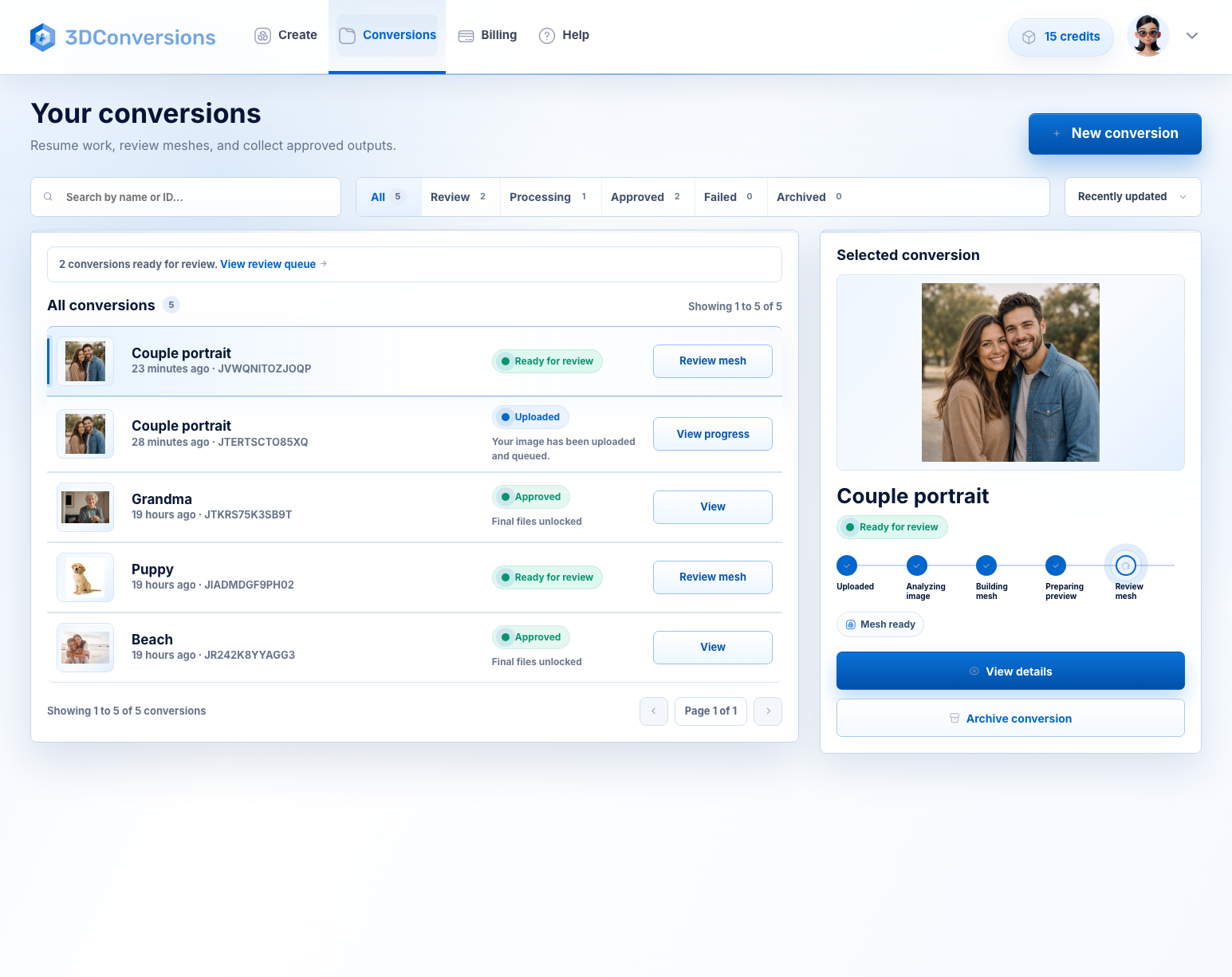
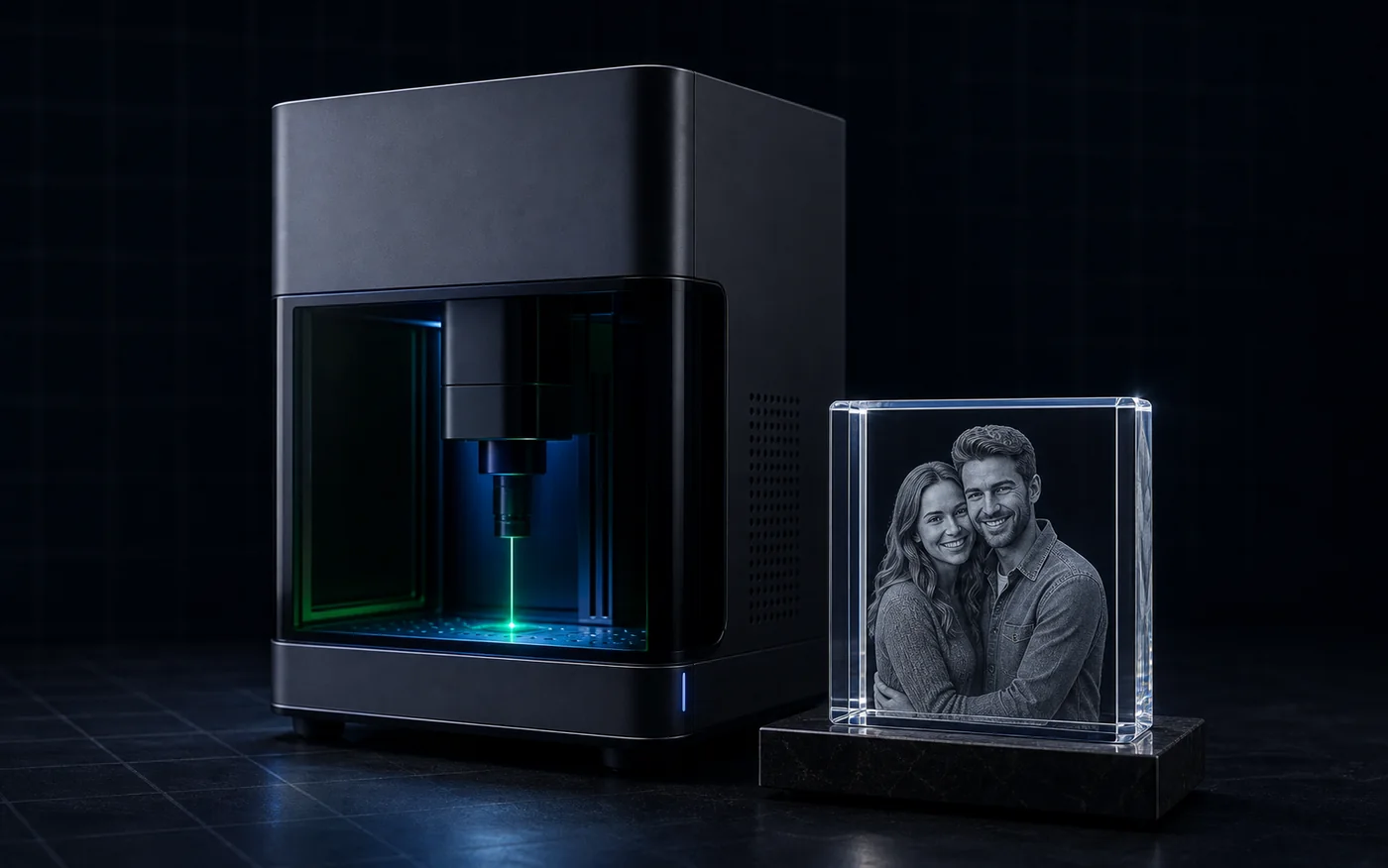 Ergebnis mit Laserinnengravur in Kristall/Glas
Der Dateiengpass
Ein UV-Laser löst das Dateiproblem nicht von selbst. Wenn ein Kunde ein normales Foto sendet, brauchen Sie weiterhin nutzbare Tiefe, bevor Sie ein Kristall-, Glas- oder Innengravurprodukt erstellen können. 3DConversions gibt Ihnen diese erste Dateientscheidung schnell: Ist dieses Foto bereit zur Freigabe, oder sollten Sie es überspringen, bevor Sie Zeit verschwenden?
Verwenden Sie das Kunden-JPG oder PNG, kein Platzhalter-Asset.
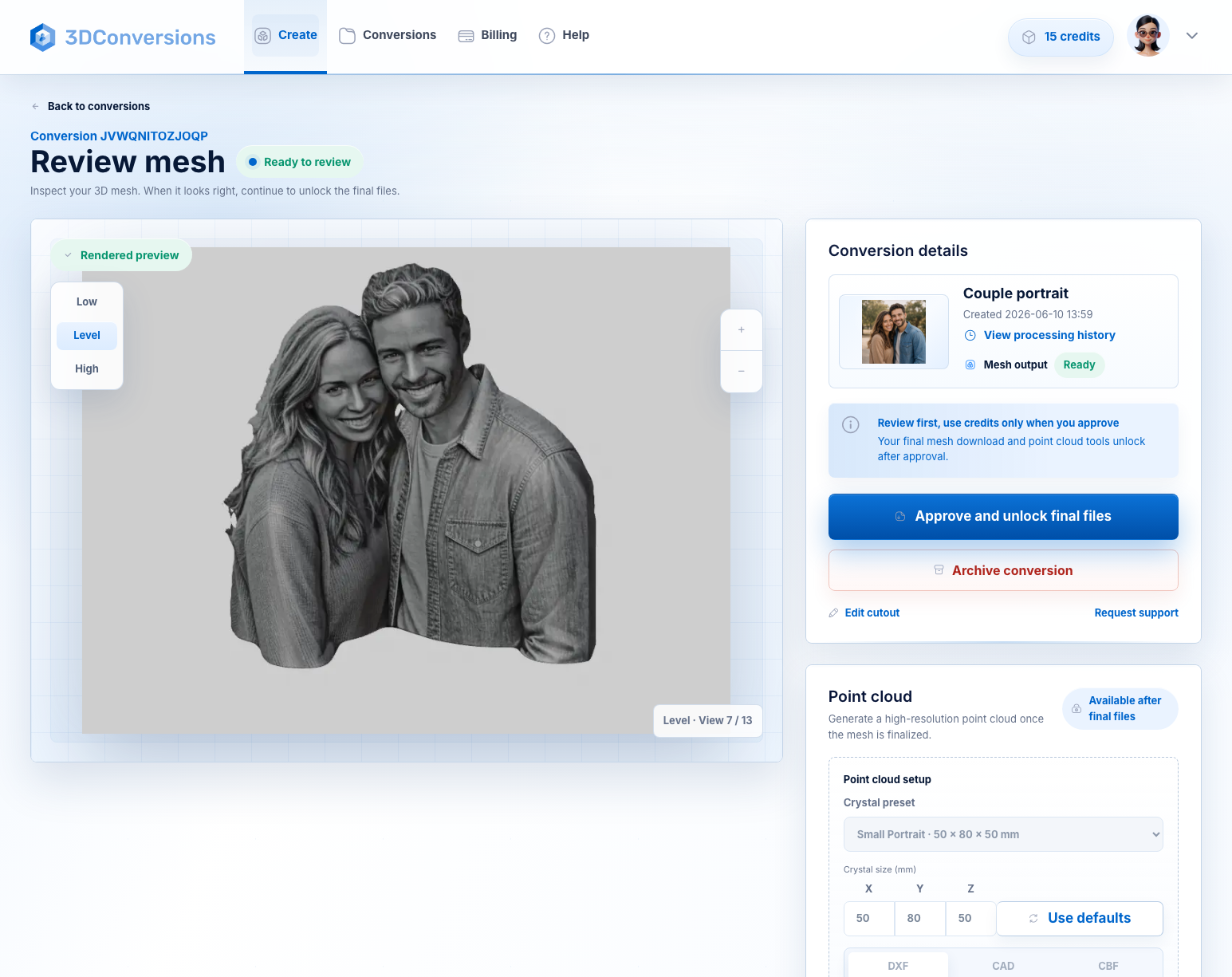
Prüfen Sie die generierte 3D-Tiefe, bevor Credits verbraucht werden.
Jede freigegebene Datei verbraucht 5 Credits. 1 Credit = $1 USD.
Ihre UV-Laser-Einstellungen, Fokus, Materialtests und Software-Workflows bleiben bei Ihnen.
Workflow
Eine schnelle Möglichkeit zu entscheiden, ob es sich lohnt, ein Kundenfoto für Ihren UV-Laser-Workflow in eine 3D-Datei zu verwandeln.
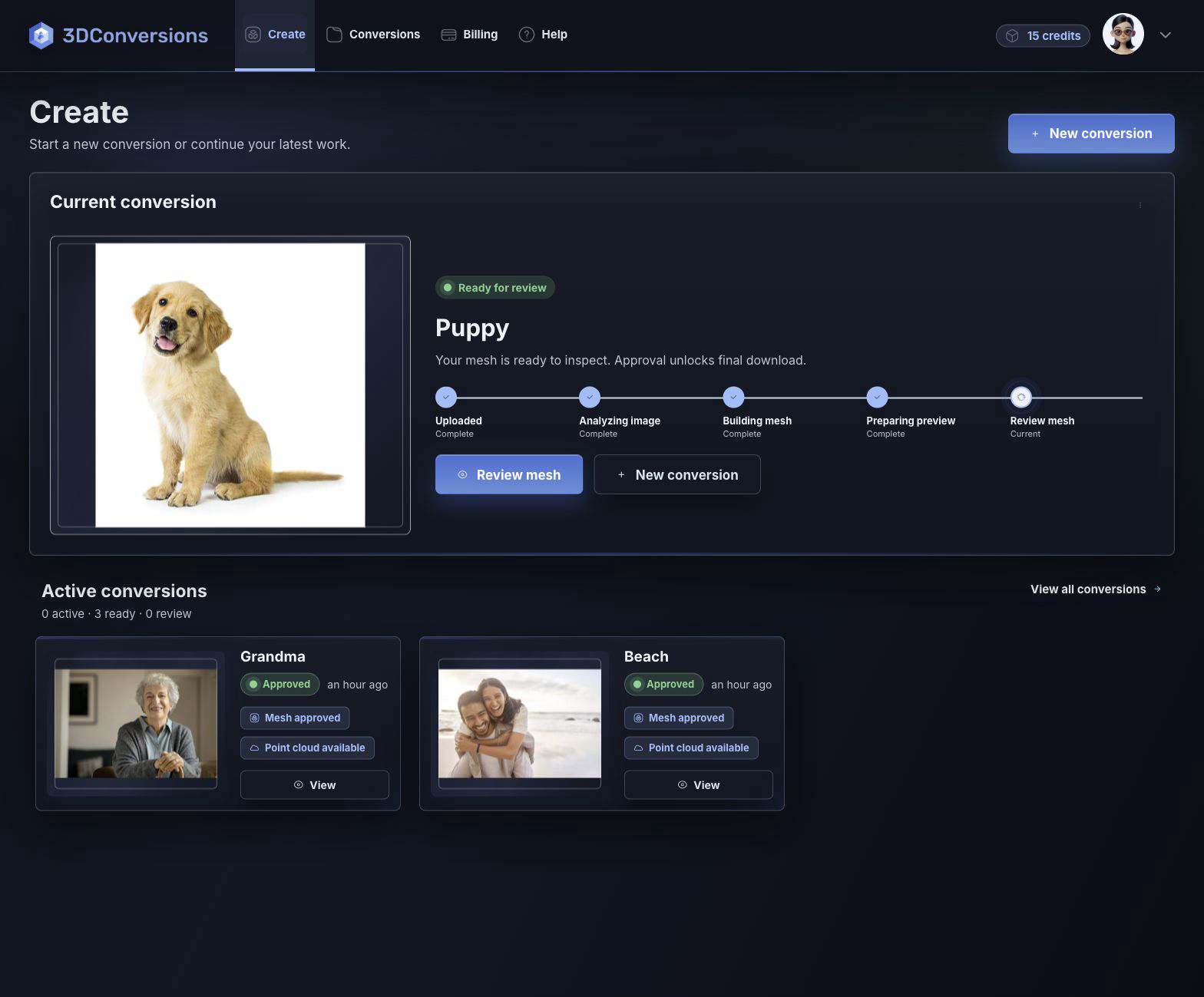
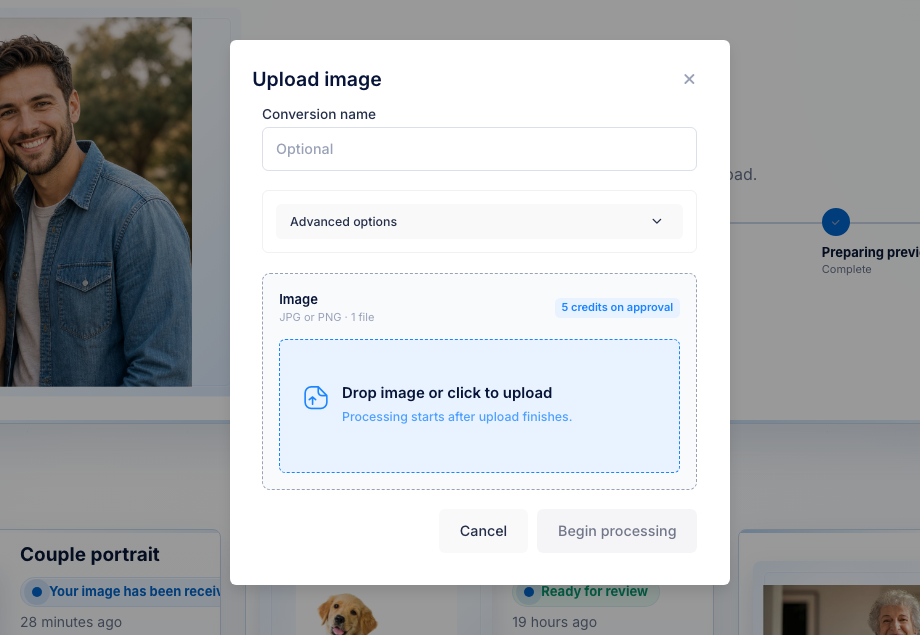
Beginnen Sie mit dem JPG oder PNG, das Ihr Kunde bereits gesendet hat.
Überprüfen Sie das generierte 3D-Tiefennetz, bevor Sie Credits ausgeben.
Wenn die Vorschau bereit ist, geben Sie sie für 5 Credits ($5 USD) frei und laden OBJ sowie Punktwolkenexporte herunter.
Beginnen Sie mit gängigen Bilddateien für Kunden.

OBJ-Mesh nach Freigabe.
DXF, CAD und CBF nach Freigabe.
pro genehmigter Datei
1 Kredit = $1 USD. Hochladen, Bearbeiten und Vorschau sind kostenlos.Downloads sind nach der Freigabe verfügbar und enthalten OBJ-Mesh sowie DXF-, CAD- und CBF-Punktwolkenexporte.
Datei- und Ausgabedetails
3DConversions übernimmt den Schritt vom Foto zur Tiefe. Sie übernehmen den UV-Laser. Prüfen Sie zuerst die generierte 3D-Datei in der Vorschau und geben Sie dann nur die Dateien frei, die Sie in Ihrem Kristall-, Glas- oder Subsurface-Gravur-Workflow verwenden möchten.
Entwickelt für Workflows mit UV-Lasergravur in Kristall, Glas und unter der Oberfläche, einschließlich 355-nm-UV-Maschinen. Dadurch werden gravurbereite 3D-Tiefendateien vorbereitet; Leistung, Geschwindigkeit, Fokus oder Maschinenkalibrierung werden nicht ausgewählt.
Beispielergebnis
Laden Sie das Foto hoch, drehen Sie die generierte Tiefenvorschau und prüfen Sie Motivform, Kante sowie Gesichts- oder Tier-Tiefe vor der Freigabe. Wenn das Motiv schwach ist, geben Sie es nicht frei. Wenn es bereit ist, laden Sie die Dateien herunter und wechseln in Ihren UV-Laser-Workflow.
Kostenlos mit 25 Credits starten
Tiefenerzeugung
UV Fragen zur Lasergravur
Ja. Es ist für UV-Laserbetreiber gedacht, die Kundenfotos in 3D-Dateien für die Arbeitsabläufe zur Kristall-, Innenglas-, Porträt-, Haustier-, Gedenk- und Geschenkgravur umwandeln.
Der Workflow ist auf Minuten ausgelegt, nicht auf Tage in einer 3D-Modellierungswarteschlange. Laden Sie das Kundenbild hoch, prüfen Sie die generierte Tiefenvorschau und geben Sie endgültige Dateien nur frei, wenn das Ergebnis bereit ist.
Jede freigegebene Datei verbraucht 5 Credits ($5 USD). Hochladen, Verarbeitung und Vorschau sind kostenlos, Sie verbrauchen Credits also nur, wenn Sie die endgültige Datei freigeben.
Ja. 3DConversions erstellt Foto-zu-3D-Tiefenvorschauen und finale Dateiexporte für UV-Lasergravur-Workflows, einschließlich Kristall-, Glas- und Innengravurarbeiten. Maschinenleistung, Fokus, Linse, Software, Materialeinstellungen und Kalibrierung bleiben Teil Ihres Laser-Workflows.
UV-Laser sind für kleine Werkstätten attraktiv, weil viele 355-nm-Systeme günstiger, kompakt und für Glas-, Kristall-, Acryl-, beschichtetes Metall-, Auszeichnungs- und Geschenk-Workflows nützlich sind. Grüne 532-nm-Systeme bleiben die etablierte Spezialistenwahl für klassische Subsurface-Kristallgravur. In beiden Fällen braucht das Kundenfoto weiterhin nutzbare 3D-Tiefe.
Nein. Es wird die 3D-Gravurdatei erstellt, nicht G-Code, Geschwindigkeit, Leistung, Fokus, Materialvoreinstellungen oder Maschinenkalibrierungseinstellungen.
Nach der Genehmigung können Sie das OBJ-Netz sowie DXF-, CAD- und CBF-Punktwolkenexporte für UV-Lasergravur-Workflows herunterladen.
Beginnen Sie mit einem Foto
Erstellen Sie ein kostenloses Konto mit 25 Credits, laden Sie ein Kundenfoto hoch, prüfen Sie die generierte 3D-Tiefe in der Vorschau und geben Sie endgültige Dateien nur frei, wenn Motivform, Kante sowie Gesichts- oder Tier-Tiefe die Nutzung wert sind.
Keine Kreditkarte erforderlich. Die kostenlose Anmeldung enthält 25 Credits, genug für 5 freigegebene Dateien. Jede freigegebene Datei verbraucht 5 Credits ($5 USD).